A stand mixer making a grinding noise often signals a mechanical issue that requires attention. This sound is distinct from the motor's normal hum or the clatter of loose accessories. Identifying the source of the grinding can save you frustration and potentially extend the life of your appliance.
Most grinding noises stem from a few common problems. These range from simple user errors, like improper attachment placement, to more complex internal component wear. Addressing the issue promptly can prevent further damage to your stand mixer.
Check the Attachment and Bowl First
Many grinding sounds are not internal motor problems but rather issues with how the accessories interact with the mixer. This is the first and most common area to investigate.
Improperly Attached Beater or Bowl
One of the most frequent causes of grinding noises is a bowl or attachment that is not fully seated. A bowl that isn't locked into place can wobble, causing the beater to rub against the bowl or the mixer's internal components. Similarly, a beater, whisk, or dough hook that isn't pushed all the way up onto the attachment shaft and locked into the retaining pin can move erratically, creating a grinding or knocking sound.
To fix this, simply remove the bowl and attachment. Re-seat the bowl firmly into its base, making sure it clicks into position if your model has a locking mechanism. Then, re-attach your chosen accessory, pushing it upwards until it cannot go any further, and turn it slightly if needed to engage the pin. Make sure the mixer head is fully locked down if you have a tilt-head model.
Overloading the Mixer
Stand mixers are robust tools, but they have limits. Attempting to mix too much heavy dough, like stiff bread dough or dense cookie dough, can strain the motor and gears, leading to a grinding noise. The mixer's motor works harder, and internal components may struggle to keep up, resulting in friction.
Check your mixer's manual for its recommended capacity. For instance, a 5-quart mixer like the KitchenAid Artisan Series 5 Quart Tilt Head Stand Mixer with Pouring Shield KSM150PS is built to mix up to 9 dozen cookies in a single batch, based on manufacturer data. A slightly smaller 4.5-quart model, such as the KitchenAid Classic Series 4.5 Quart Tilt-Head Stand Mixer K45SS, handles up to 8 dozen. Exceeding these limits, especially with thick mixtures, can cause stress. If you suspect overloading, reduce the amount of ingredients. Break up large batches into smaller, more manageable portions to prevent the mixer from straining. Use the appropriate speed setting, generally starting slow and increasing gradually for heavy doughs, as outlined in How to Use a Stand Mixer: Speeds, Tools, and Care.
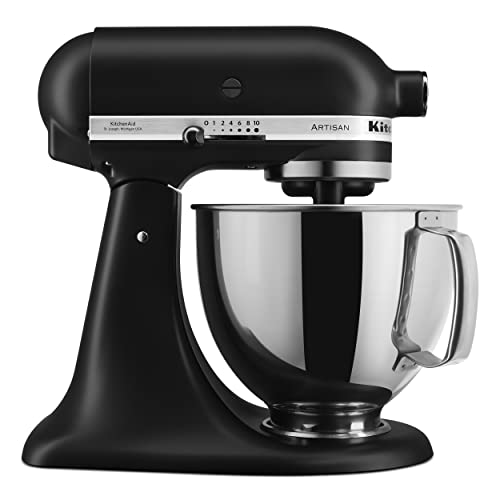
- Built to take it all on with the durable and built-to-last metal construction, and 59 touchpoints around the mixer bowl for great mixing results.. 5 Quart Stainless Steel Bowl with comfortable handle for small or large batches, to mix up 9 dozen cookies* in a single batch. Dishwasher safe. *Using the flat beater; 28g dough each.. Easily add ingredients with the tilt-head design, because you'll have better access to the bowl - lock the head in place while mixing.. 10 speeds for nearly any task or recipe, from mixing ingredients together on the stir speed, to whipping cream at speed 8, you'll get thorough ingredient incorporation every time.
The KitchenAid Classic Series 4.5 Quart Tilt-Head Stand Mixer K45SS offers durable, built-to-last metal construction. It features 59 touchpoints around the mixer bowl for thorough mixing results. The 4.5 quart stainless steel bowl can handle up to 8 dozen cookies in one batch, using the flat beater and 28g dough each. Its tilt-head design provides easy access to the bowl for adding ingredients, and the head locks in place during mixing. With 10 speeds, this mixer can manage almost any task or recipe, from gentle stirring to fast whipping, making sure ingredients are incorporated well every time.
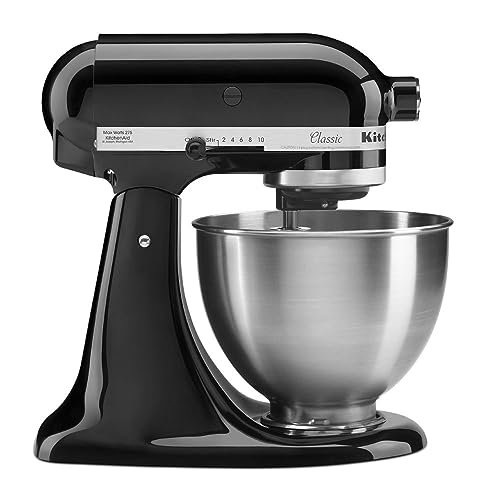
- Built to take it all on with the durable and built-to-last metal construction, and 59 touchpoints around the mixer bowl for great mixing results.. 4.5 Quart Stainless Steel Bowl to mix up to 8 dozen cookies in a single batch. Dishwasher safe. Using the flat beater; 28g dough each. Easily add ingredients with the tilt-head design, because you'll have better access to the bowl - lock the head in place while mixing. 10 speeds for nearly any task or recipe, from mixing ingredients together on the stir speed, to whipping cream at speed 8, you'll get thorough ingredient incorporation every time
Using the Wrong Attachment for the Task
Each stand mixer attachment is designed for a specific purpose. Using a wire whisk for heavy bread dough, for example, puts undue stress on the mixer. The whisk isn't strong enough for such a dense mixture and can bend or clash with the bowl, creating grinding or scraping sounds. Similarly, a dough hook might struggle with very light batters, potentially causing the motor to work inefficiently.
Always match the attachment to your recipe: the flat beater for general mixing and creaming, the wire whisk for aerating and whipping, and the dough hook for kneading yeast doughs. Consulting your mixer's manual will confirm the correct attachment for various tasks.
Foreign Objects in the Bowl
Sometimes, a small, unintended object can fall into the mixing bowl and cause grinding noises. This could be anything from a piece of jewelry, a small utensil, or even a stray ingredient wrapper. When the mixer runs, the beater can catch this object, leading to a grinding or scraping sound against the bowl or the attachment itself.
Before mixing, always inspect the bowl and ingredients carefully to make sure no foreign objects are present. If you hear grinding, immediately turn off the mixer and unplug it. Then, remove the attachment and bowl to thoroughly check for anything that might be interfering.
For more general troubleshooting, including issues like your mixer walking across the counter or not turning on, there are specific guides available.
Gearbox Issues and Lubrication Problems
If the external checks do not resolve the grinding noise, the problem likely lies within the mixer's internal mechanics, specifically the gearbox.
Worn or Stripped Gears
Many stand mixers, especially older models, use a combination of metal and plastic gears. The plastic gears are often designed to be a fail-safe, stripping before the motor is damaged in case of extreme overload. Over time, or with consistent heavy use, even metal gears can wear down, chip, or strip. When gears are damaged, they no longer mesh smoothly, producing a distinct grinding sound as they struggle to engage.
Symptoms of worn gears include a persistent grinding noise, often accompanied by a reduction in power or the mixer stopping altogether. The sound might initially be intermittent, becoming constant as the damage worsens. If you are comfortable with disassembling the mixer and have the right tools, you can replace them yourself. Otherwise, calling a professional technician is advisable.
Loss of Lubrication (Grease Breakdown)
Inside your stand mixer's gearbox, gears operate in a bath of grease, which reduces friction and allows for smooth movement. Over many years, this food-safe grease can dry out, harden, or migrate away from the gears. When lubrication is insufficient, the gears grind against each other without the necessary cushioning, creating a grinding noise and potentially leading to overheating. This is a common issue in older mixers.
Regreasing involves disassembling the mixer's head, cleaning out old grease, and applying fresh, food-grade lubricant. This process can be messy and requires some technical comfort. If you are not comfortable with internal disassembly, a professional technician can perform this service. The labor cost for regreasing is usually similar to or slightly less than gear replacement, depending on the time involved.
Motor or Speed Control Board Problems
These issues are less common than attachment or gear problems but are more serious and often require professional attention.
Motor Brush Wear
Stand mixers use carbon motor brushes to transfer electrical current to the motor's rotating parts. These brushes gradually wear down over time, much like pencil erasers. When they become too short, they may not make consistent contact, leading to intermittent power and sometimes a grinding or sparking sound as they struggle to connect. You might also notice a burning smell.
Many mixers have easily accessible brush caps on the side of the motor housing. If you are unsure, consult your mixer's manual or seek professional help.
Faulty Speed Control Board
The speed control board regulates the power delivered to the motor, allowing you to select different mixing speeds. If this board malfunctions, it can send inconsistent power, causing the motor to run erratically. This erratic operation can manifest as a grinding noise, especially at certain speeds, or the mixer might struggle to maintain a consistent RPM.
A faulty speed control board is a more complex electrical issue. Due to the electrical nature of this repair, it is often best left to a qualified technician, unless you have experience with appliance electronics. Professional labor costs for this repair can add significantly to the total.
Attachment-Specific Grinding
While the mixer's main motor might be fine, an attachment itself can be the source of a grinding noise, particularly those with internal moving parts.
Grinding from a Meat Grinder Attachment
Meat grinder attachments, like the KitchenAid Stand Mixer Attachment, Food Grinder KSMMGA, Metal Food Grinder, can make grinding noises if not used correctly. This often happens when processing meat with too many bones, gristle, or sinew that gets caught in the grinder plates or auger. Forcing ingredients through can strain the attachment's internal gears or the mixer's power hub.
To avoid this, make sure your meat is properly prepped, free of large bones, and cut into manageable pieces. Do not force meat into the grinder. Instead, let the attachment do the work at a steady pace. According to manufacturer data, the KitchenAid Food Grinder attachment comes with fine, medium, and coarse grinding plates, plus two sausage stuffer tubes, allowing for versatility. Pre-chilling the grinder in the refrigerator or freezer helps maintain a cold grinding temperature, which makes for a cleaner grind and less strain. If you hear grinding, stop immediately, disassemble the attachment, clear any blockages, and reassemble it correctly. This attachment connects to any household KitchenAid Stand Mixer power hub, using the mixer's motor to operate.
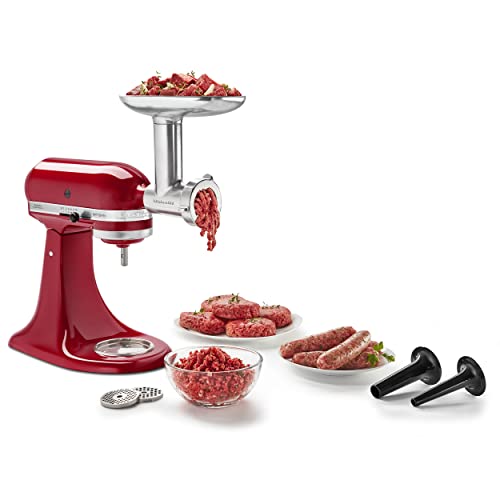
- Connect to any household KitchenAid Stand Mixer power hub and use the power of the motor to run the metal food grinder attachment. sold separately.. The possibilities for creating fresh, inventive foods are endless with the included fine, medium and coarse grinding plates and two sausage stuffer tubes.. The larger food tray allows you to process more ingredients in one batch, cutting down on food prep time. Compared to model FGA.. Pre-chill the grinder in the refrigerator or freezer to maintain a cold grinding temperature for a neat and clean grind every time.
For more information on various attachments, you can consult our guide on The Best KitchenAid Attachments, Ranked by What You Actually Use.
When to Seek Professional Repair or Consider Replacement
Deciding whether to repair your stand mixer or replace it often comes down to the cost of repair versus the age and overall condition of the appliance. If your mixer is still under warranty, contact the manufacturer first, as repairs might be covered. Attempting DIY repairs could void your warranty.
For minor issues like brush replacement or regreasing, a DIY approach can be cost effective if you have the tools and confidence. However, for more complex internal repairs, especially involving the speed control board or extensive gear replacement, consider the cost of professional labor. If the repair cost approaches or exceeds half the price of a new mixer, especially for an older model, investing in a new stand mixer might be a more economical choice in the long run. Modern mixers, such as the KitchenAid Artisan Series 5 Quart Tilt Head Stand Mixer, offer robust construction and reliable performance that could make a new purchase a worthwhile upgrade.
Ultimately, addressing a grinding noise quickly can help prevent minor issues from becoming major, ensuring your stand mixer continues to serve your baking needs for years to come. Remember to always unplug your mixer before attempting any inspection or repair.